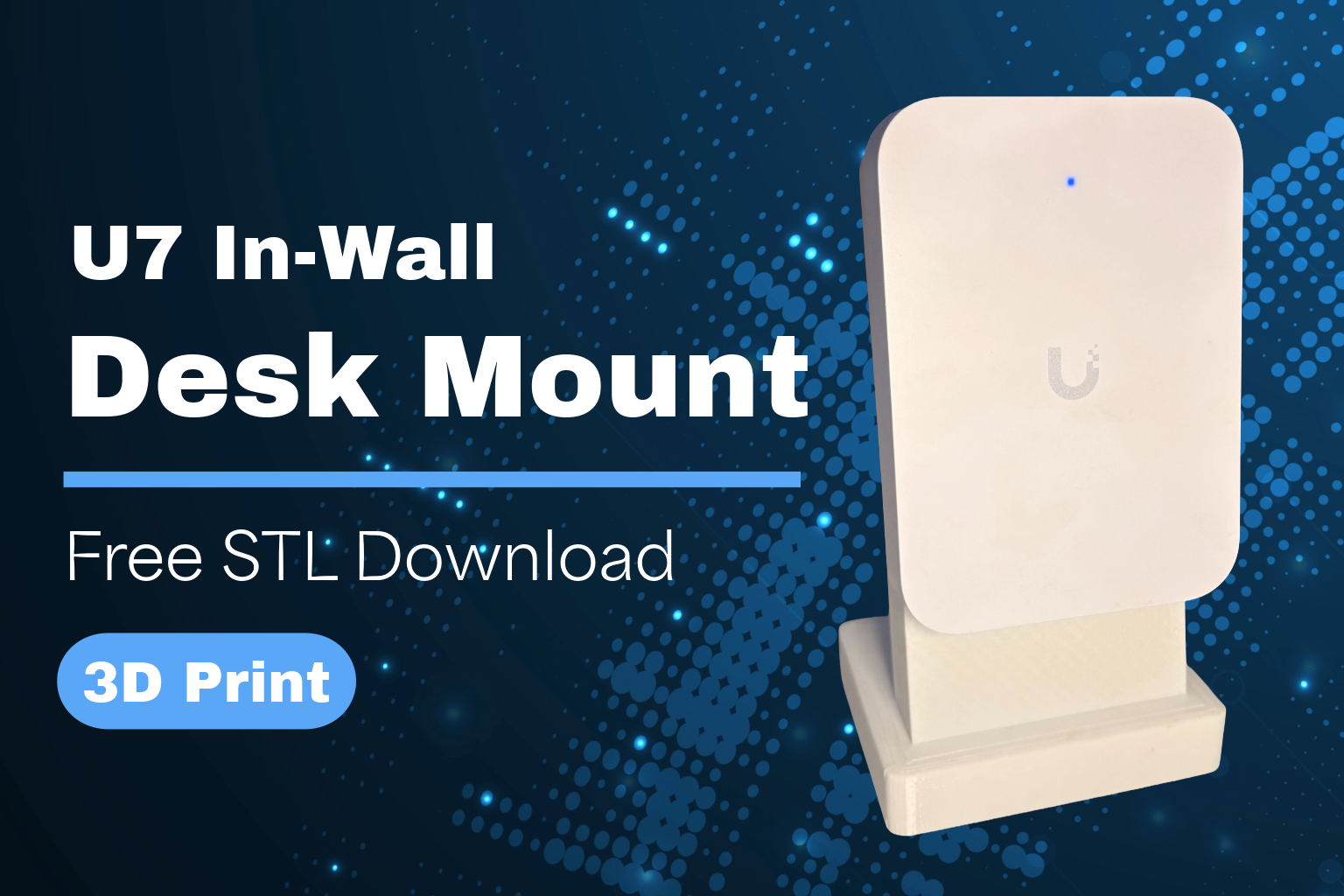
If you’ve been looking for a U7 In-Wall desk mount, you’ve probably noticed something odd—Ubiquiti offers a desk mount for the U7 Pro Wall, but not for the standard U7 In-Wall.
At first glance, the two devices are very similar, but there are some important differences. The U7 Pro Wall is the more powerful option from a WiFi perspective, with tri-band support including 6GHz. The U7 In-Wall, on the other hand, is a dual-band WiFi 7 device, so it’s technically less capable in pure wireless performance.
However, the U7 In-Wall has a key advantage that makes it especially useful at a desk: it includes two 2.5Gbps passthrough ports, one of which supports PoE. That makes it ideal for setups where you want both strong WiFi and wired connectivity for devices like VoIP phones or other network equipment.
Given that use case, it’s a bit surprising there’s no official desk mount for the U7 In-Wall—especially when one exists for the Pro model. For anyone wanting a clean desk setup with both wireless and wired connectivity, it feels like an obvious omission.
So, I decided to design my own!


One caveat: I’m not a CAD expert, so this is very much a practical, working design rather than a perfect one. If you have ideas for improvements or refinements, I’d genuinely welcome feedback.
U7 In-Wall Desk Mount Design Features
The design is intentionally simple and practical, using a two-piece construction that’s easy to print and assemble.
- 10° angled face
The front is tilted back by 10 degrees to shift the centre of gravity and prevent the U7 In-Wall from tipping forward on a desk. - Secure mounting points
Pre-aligned holes are included for brass heat-set inserts, along with a cut-out that matches the rear recess of the U7 In-Wall for a more secure fit. - Integrated cable management
A rear cable channel with slight overhangs helps hold the cable in place, keeping the setup tidy. The base also includes a pass-through hole so the cable can be routed cleanly from underneath into the channel. - Weighted base support
Slots are built into the base to fit M10 washers (2 at the front and 6 at the rear). This adds extra weight and helps prevent accidental knock-overs. - Anti-slip base option
A 1mm recessed area on the underside allows you to add a cork sheet for improved grip on smooth desk surfaces. - Refined shape
The top corners of the face are rounded off slightly to give the mount a cleaner, less “blocky” look.
Overall, the mount fits the U7 In-Wall well and keeps it stable on a desk, while still leaving plenty of clearance at the bottom for easy access to the passthrough ports.
If you’re trying to decide between the U7 In-Wall and the U7 Pro Wall, I’ve put together a full comparison of the two that’s worth a read before you buy.

U7 In-Wall
- WiFi 7
- Passthrough Ports
- 2.5GbE Ethernet


U7 Pro Wall
- WiFi 7
- Triband includes 6Ghz
- 2.5GbE Ethernet


U7 XG Wall
- WiFi 7
- Triband includes 6Ghz
- 10GbE Ethernet
U7 In-Wall Desk Mount Print Settings
These are the print settings I used for this U7 In-Wall desk mount. They worked well for me, but I wouldn’t consider them final or fully optimised.
- Material: PLA (PETG should also work well for added durability)
- Layer height: 0.2mm
- Infill: 15–20%
- Supports: Minimal supports recommended (mainly for the cable channel overhangs)
- Print orientation: Base flat on the bed; face printed separately for best surface finish
- Walls/Perimeters: 3 walls recommended for strength
The design is fairly forgiving, so there’s definitely room to tweak these settings depending on your printer and preferences.
Wondering where to place your UniFi Access Points for best coverage?
Check out our Blog Post: UNIFI AP PLACEMENT: WHERE TO MOUNT ACCESS POINTS FOR BEST WIFI
Feedback welcome
I’ll be honest—I’m not an expert when it comes to dialling in print settings. If you’ve printed this U7 In-Wall desk mount and found better settings (stronger, cleaner, faster, etc.), I’d really appreciate you sharing them.
Any improvements or optimisations will help make this design better for everyone.
Desk Mount Design Notes
This U7 In-Wall desk mount was designed in TinkerCAD, with a focus on simplicity and practical usability rather than complex modelling.
The goal was to create a clean, functional 3D printable mount that fits the U7 In-Wall well, prints reliably, and works in a real desk setup without overcomplicating the design.
Because of that, there’s definitely room for refinement. If you’re more experienced with CAD tools and want to improve or adapt this desk stand for U7 In-Wall, feel free to build on it or share your own version.
Assembling the U7 In-Wall Desk Mount
Assembling this desk stand for U7 In-Wall is straightforward and only requires a
1. Install the Brass Inserts in the U7 In-Wall desk mount
Insert the brass heat-set inserts into the pre-aligned holes on the main body. A soldering iron or dedicated insert tool works best for this.

2. Add weight to the base of the U7 In-Wall Desk Mount
Place M10 washers into the slots on the underside of the base (2 at the front and 6 at the rear). This helps improve stability and prevents the mount from tipping.

3. Attach optional cork base
If you’re using a cork sheet, cut it to size and fit it into the 1mm recessed area. This helps improve grip on your desk.

4. Route the cable through
Feed your network cable through the hole in the base and into the rear cable channel. The built-in overhangs will help keep it securely in place.

5. Assemble the U7 Desk Mount
Join the two printed parts together, they just slot into place.

6. Fit the U7 In-Wall to the Desk Mount
Place the UniFi U7 In-Wall into the mount, ensuring it sits correctly in the rear recess and remains stable.

Once assembled, the 3D printed desk mount for UniFi U7 should sit securely on your desk with easy access to the passthrough ports at the bottom.
Conclusion
Overall, this U7 In-Wall Desk Mount fills a gap that Ubiquiti has surprisingly left open. While the U7 Pro Wall has an official stand, in contrast, the U7 In-Wall is arguably better suited to desk use thanks to its built-in 2.5Gbps passthrough ports and PoE capability—making a dedicated mount even more useful.
This design keeps the access point stable, neatly routes cables through the base, and maintains full access to the rear ports, resulting in a clean and practical desk setup. Whether you’re running a home lab, office environment, or just want a more flexible placement option, this U7 desk mount provides a simple and effective solution.
If you’ve got access to a 3D printer, it’s an easy project that delivers a professional result with minimal cost. Download the STL, print your own, and customise it to suit your setup.
Ubiquiti UniFi U7 WiFi content in our blog below:
UBIQUITI UNIFI U7 LITE REVIEW REAL SPEED TESTS SETUP WI FI 7 EXPLAINED
FAQs
Can the U7 In-Wall be used on a desk?
Yes, the U7 In-Wall can be used on a desk with a suitable stand. A U7 In-Wall Desk Mount allows stable placement while maintaining access to ports and proper cable routing.
Is there an official U7 In-Wall Desk Mount from Ubiquiti?
No, Ubiquiti does not currently offer an official U7 In-Wall Desk Mount, despite offering a stand for the U7 Pro Wall. This makes custom or 3D printed options a popular alternative.
Does the U7 In-Wall Desk Mount block airflow?
No, this design keeps the access point elevated and unobstructed, allowing for proper airflow around the device. This helps maintain performance and prevents overheating.
Can I still use the passthrough ports on the U7 In-Wall?
Yes, one of the main advantages of this U7 In-Wall Desk Mount is that it preserves full access to the rear passthrough ports, including the 2.5Gbps and PoE port.
How is the U7 In-Wall powered on a desk setup?
The U7 In-Wall can be powered via PoE (Power over Ethernet), just like in a wall-mounted installation. Simply connect it to a PoE switch or injector.
What materials are recommended for printing the desk mount?
PLA is typically sufficient for indoor use, but PETG is recommended for improved durability and heat resistance, especially in warmer environments.
Do I need additional hardware for the U7 In-Wall Desk Mount?
Yes, this design uses brass heat set inserts and M10 washers to improve strength and stability. Optional cork can be added to the base for better grip.
Is this U7 In-Wall Desk Mount compatible with other UniFi models?
No, this mount is specifically designed for the U7 In-Wall and may not fit other UniFi access points without modification.
Can I customise the design before printing?
Yes, since the STL file is provided, you can modify the design in CAD software to adjust dimensions, cable routing, or aesthetics to suit your setup.
Is a 3D printed desk mount stable enough for daily use?
Yes, when printed correctly and assembled with the recommended components, the U7 In-Wall Desk Mount is stable enough for everyday desk use.
Why would you use a desk mount instead of wall mounting?
A desk mount provides flexibility for temporary setups, testing environments, or situations where wall mounting is not practical. It also makes it easier to access ports and reposition the device.
Does the desk mount affect WiFi performance?
No, placing the U7 In-Wall on a desk typically does not negatively impact performance, provided it is positioned in an open area with minimal obstruction.
Can I run cables neatly through the desk mount?
Yes, this design includes internal cable routing, allowing Ethernet cables to be fed through the base for a cleaner and more organised setup.
Author: Huw Jones – Home Network Solutions Berkshire
Huw is a UniFi specialist and the owner of Home Network Solutions Berkshire, providing professional networking, CCTV, gate automation and smart home installations across the UK. With years of hands-on experience and a growing YouTube audience at @home.network.solutions, Huw creates practical, no-nonsense guides to help homeowners and installers get the best out of their UniFi systems.
Leave a Reply